Why look for a Recut alternative?
Usually not because Recut fails at its job — it doesn't. The friction is location. Recut runs on Mac and Windows, so every edit starts with getting your recording off the phone: AirDrop or cable to the computer, cut, then send the result back to wherever you post from. For a desktop-based workflow that's fine. For a phone-based one, the transfer takes longer than the edit.
The search for "Recut for iPhone" is really a search for the same idea — automatic, threshold-based silence cutting — living on the device that shot the footage.
What is Recut, honestly?
Recut is a well-built desktop tool. It analyzes your audio or video, finds the silence, and generates a cut list non-destructively — your original file is untouched. It exports finished media, but its standout feature is handing the cut list to a real editor: Premiere Pro, DaVinci Resolve, Final Cut Pro, ScreenFlow, even CapCut. It also handles multi-track projects across multiple cameras and microphones, and one license covers both Mac and Windows.
If your silence pass is the first step of a bigger timeline edit on desktop, that NLE handoff is genuinely valuable, and no phone app replaces it. Recut's own site lists no mobile version — it's a desktop product by design.
Is there a Recut for iPhone?
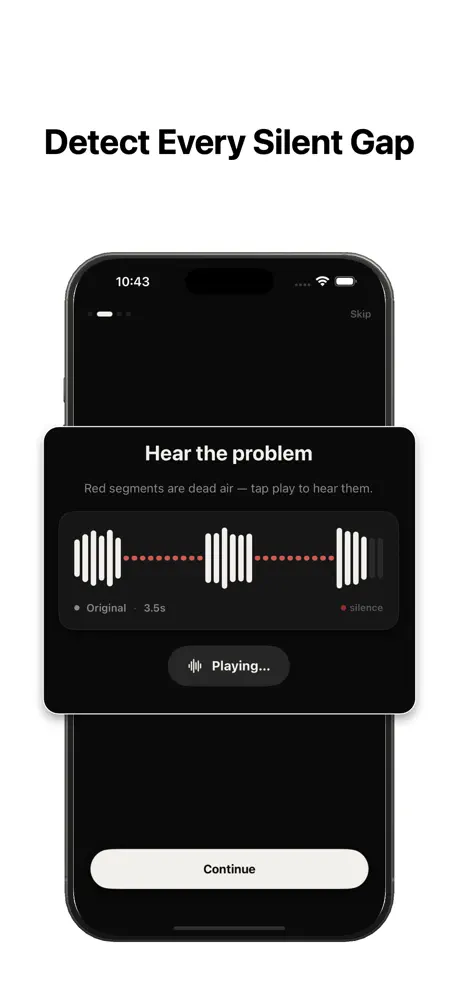
Not from Recut itself — as of this writing, their site offers Mac and Windows only. But the core job Recut automates — detect quiet gaps, cut them, keep speech intact — doesn't require a desktop. [SilenceRemover](/) does the same threshold-based pass natively on iOS: import a file, tune threshold, minimum silence length, and padding, preview the cuts, export. Free to download, with an optional subscription for full features.
It processes entirely on-device with no upload and no account, and it opens MP4, MOV, MP3, WAV, AIFF, and M4A — so the phone recording never has to leave the phone.
How does the same job work on iPhone?
The mechanics are the ones Recut users already know. A threshold defines what counts as silence relative to your speech. A minimum silence length keeps natural breathing pauses while catching the long gaps. Padding protects the first and last syllables around every cut so nothing sounds clipped.
You adjust, preview, adjust again — usually two or three passes is enough — and export a tightened file straight to Photos or Files. Because the controls are the same three ideas, settings that worked on one recording carry over to the next one from the same mic and room. The full technique, including starting values that work for most voice recordings, is in our guide to removing silence from audio and video.
What do you give up by leaving the desktop?
Be clear-eyed about this. SilenceRemover exports a finished cut, not a cut list — there's no timeline export to Premiere, Resolve, or Final Cut, and no multi-track or multicam support. It also works one file at a time; there's no batch queue for a folder of episodes.
If your workflow is "rough-cut in Recut, then polish for an hour in an NLE with multiple camera angles", stay on the desktop — that's the workflow Recut was built for, and a phone app would just add a step.
What do you gain on the phone?
The transfer step disappears entirely: record, cut, post — one device, minutes end to end. Processing is on-device, so nothing is uploaded and it works offline, on a plane or anywhere without signal. There's no account and nothing to sync.
You also gain places to edit. The gap between recording something and tightening it drops to whenever you have your phone — on the train, right after the take, in the minutes before publishing — instead of whenever you're next at your computer. For creators who post from their phone anyway, the output lands exactly where it's needed.
How do the workflows compare step by step?
Desktop path: record on phone, transfer the file to the computer, open Recut, cut, export (or hand off to an NLE), transfer the result back to the phone or upload from desktop. Five or six steps, two devices.
Phone path: record, open SilenceRemover, cut, export, post. Three or four steps, one device. Neither path is wrong — the question is where your footage starts and where it needs to end up. When both ends are the phone, the desktop round trip is pure overhead.
Can you use both?
Yes, and some creators sensibly do. Quick phone-shot clips — Shorts, Reels, voice memos, a podcast segment recorded on the go — get the on-device pass and go straight out. Larger productions that were always going to be edited on desktop — multicam interviews, screencasts destined for a Premiere timeline — go through Recut.
The tools don't conflict because they sit in different places in your life: one where the phone footage lives, one where the desktop projects live.
Who should choose which?
Choose Recut if you edit on a Mac or Windows machine, need cut lists inside Premiere, Resolve, Final Cut, or ScreenFlow, or work with multi-track and multicam recordings. It's the right tool for desktop production, and this is exactly the trade we describe in our Descript comparison: suite features earn their place when you actually use them.
Choose SilenceRemover if your recordings start on your iPhone and mostly end there too — you want the dead air gone in one private, on-device pass without a computer in the loop.